

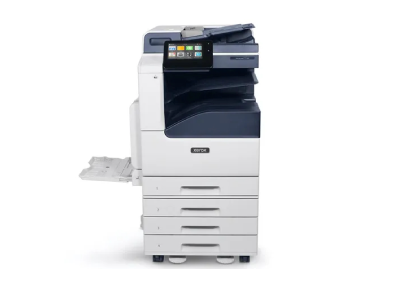
Device A
Xerox VersaLink C7130
Top of the Xerox workgroup range — 30ppm A3 colour with ConnectKey
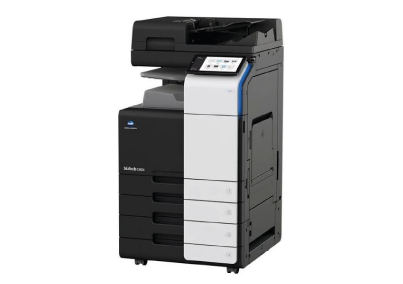
Device B
Konica Minolta bizhub C300i
A3 colour MFP with Bitdefender AV integration and 10.1-inch touchscreen
VS
COMPARISON
Side by Side
Core specifications for both devices. All figures are manufacturer-stated under standard conditions.
Specification | Xerox VersaLink C7130 | Konica Minolta bizhub C300i |
|---|---|---|
Print speed | 30 ppm colour and mono | 30 ppm colour and mono |
Print resolution | 1200 x 2400 dpi | 1200 x 1200 dpi |
Max paper size | A3 | A3 |
Paper capacity (standard) | ~1,140 sheets | ~650 sheets |
Paper capacity (max) | 2,140 sheets | Up to 2,150 sheets |
Document feeder | 130-sheet DADF (duplex) | 100-sheet RADF |
Touchscreen | 7-inch colour | 10.1-inch |
Monthly duty cycle | Up to 129,000 pages/month | Up to 150,000 pages/month |
Finishing options | Optional stapling and hole punch | Optional stapling and hole punch |
Security | McAfee embedded, Security Dashboard, Configuration Watchdog | Bitdefender AV, data encryption, SSD overwrite, user authentication |
OUR VERDICT
Which Device Is Right for You?
Both are strong devices. The right choice depends on your monthly print volume, finishing needs and budget.
CHOOSE THIS IF...
VersaLink C7130: The better-specified choice for most offices
Your monthly colour volume exceeds 1,500 pages — the VersaLink is rated for sustained workgroup throughput where the C300i is not
1200 x 2400 dpi delivers sharper, more professional output than the C300i's 1200 x 1200 dpi on detailed graphics and fine text
ConnectKey's app platform, Xerox App Gallery and Fleet Orchestrator give you a richer, more capable workflow ecosystem
Xerox's UK service network offers faster engineer response and better parts availability — a meaningful factor in uptime
XOS UK can supply and manage the VersaLink under a single fully managed contract covering consumables, maintenance and priority response
Choose the VersaLink C7130 if you want a more capable, better-supported device. For most offices, that is the straightforward answer.
CHOOSE THIS IF...
bizhub C300i: A narrow fit for very specific requirements
Your monthly colour print volume is consistently below 1,000 pages and the C300i's lower lease cost is the overriding factor
Your IT security policy specifically mandates a built-in antivirus engine on all networked devices and Bitdefender meets that requirement
You are already committed to a Konica Minolta managed print agreement and introducing a second manufacturer is not feasible
Choose the bizhub C300i only if one of the above is a hard constraint — otherwise the VersaLink C7130 is the stronger device at this tier.
SECTION 01
Build quality and reliability
How each device is designed and where each sits within its manufacturer's range.
Xerox VersaLink C7130
The VersaLink C7130 is Xerox's top workgroup A3 device. It is built for shared use across a team of five to ten people printing regularly but not at very high volumes. The ConnectKey platform, McAfee embedded security and 7-inch touchscreen give it a coherent feature set that is straightforward to deploy and manage. Xerox's UK engineer and parts coverage is strong, reducing the risk of extended downtime.
Konica Minolta bizhub C300i
The bizhub C300i sits within Konica Minolta's i-Series A3 colour range. Its 10.1-inch touchscreen and Bitdefender antivirus integration are distinguishing features at this tier. The device is designed for smaller teams where moderate monthly colour output is the norm. Konica Minolta's UK service network provides coverage for maintenance and support, and organisations already holding Konica Minolta agreements will find it straightforward to extend to this device.
SECTION 02
Paper handling and capacity
Tray configuration, maximum capacity and document feeder comparison.
Xerox VersaLink C7130
The VersaLink C7130 ships with approximately 1,140 sheets across two paper trays and a bypass, expandable to 2,140 sheets. The 130-sheet DADF handles duplex scanning reliably for multi-page originals. For the majority of workgroup environments, the standard configuration handles daily volumes without constant reloading.
Konica Minolta bizhub C300i
The bizhub C300i ships with a standard configuration of approximately 650 sheets across a main paper tray and a multipurpose tray, expandable to around 2,150 sheets with optional drawers. The 100-sheet RADF is capable for routine scanning but handles smaller batches than the VersaLink's 130-sheet DADF. For offices with high scan volumes, the difference in feeder capacity is worth considering.
SECTION 03
Finishing options
Stapling, hole punching and output handling.
Xerox VersaLink C7130
The VersaLink C7130 supports optional stapling and hole punching through an add-on finisher. Booklet making and document folding are not available on this device. For standard workgroup document production, the available finishing options cover the majority of requirements.
Konica Minolta bizhub C300i
The bizhub C300i also supports optional stapling and hole punching. Finishing options are broadly comparable at this tier for both devices. Neither offers booklet making as a standard add-on at the 30ppm A3 workgroup level without moving to a higher-specified model in each range.
SECTION 04
Connectivity and cloud integration
Workflow integration, mobile printing and security platforms.
Xerox VersaLink C7130
The VersaLink C7130 runs ConnectKey, giving direct integration with Microsoft OneDrive, SharePoint, Google Drive, Dropbox and Box. Third-party apps can be installed from the Xerox App Gallery, and remote management is available via Xerox Fleet Orchestrator. McAfee Embedded Control provides real-time protection against firmware tampering and unauthorised application execution. USB, Ethernet and Wi-Fi are all supported as standard.
Konica Minolta bizhub C300i
The bizhub C300i runs Konica Minolta's platform with cloud integration to OneDrive, SharePoint and Google Drive. Its most distinctive security feature is the built-in Bitdefender antivirus engine, which actively scans the device for malware — a step beyond the embedded security on most competing devices. The 10.1-inch touchscreen gives it a navigational advantage over the VersaLink's 7-inch panel, particularly in environments where users run varied workflows. Mobile printing via Mopria and AirPrint is supported.
SECTION 05
Leasing costs and cost of ownership
Lease costs, recommended volumes and running cost considerations.
Xerox VersaLink C7130
The VersaLink C7130 carries a competitive monthly lease cost for a top-of-workgroup A3 device. Its 129,000-page monthly duty cycle provides substantial headroom above what most offices will realistically reach, meaning the device runs within its designed parameters without mechanical stress. Under a managed print contract from XOS UK, the cost per page and service response are predictable.
Konica Minolta bizhub C300i
The bizhub C300i's recommended monthly volume is around 25,000 pages. For a small team with light-to-moderate colour print requirements, this is entirely adequate. If your volume regularly exceeds this threshold, a higher-specified device — such as a larger model within the Konica Minolta i-Series — would be more appropriate to avoid running the device above its recommended level over the long term.
GET STARTED TODAY
Not Sure Which Is Right for Your Business?
Speak to XOS. We will assess your current print volume, requirements and budget and recommend the right device. No obligation, and no pressure to choose either of these if something else suits better.
Prefer to Speak to Someone?
Our team is available Monday to Friday during office hours
XOS (UK) LTD
Unit 3, Pegasus Square
Innovation Way
Grimsby, DN37 9TJ
United Kingdom